
Table of Contents
- Key Benefits of Online Payroll Software for Small Business
- Core Features to Look for in Online Payroll Software for Small Business
- Automated Tax Filing and Reporting
- Direct Deposit and Payment Flexibility
- Time and Attendance Integration
- Employee Self‑Service Portal
- Scalable Pricing Structure
- How to Choose the Right Online Payroll Software for Small Business
- Assess Your Payroll Complexity
- Evaluate Integration Requirements
- Consider Security and Compliance Certifications
- Test Customer Support Channels
- Trial the Software Before Committing
- Top Online Payroll Solutions for Small Business in 2024
- Implementation Tips for a Smooth Transition
- Plan a Data Migration Strategy
- Train Your Team Early
- Set Up Compliance Alerts
- Monitor the First Payroll Cycle Closely
- Gather Feedback and Iterate
- Future Trends Shaping Online Payroll for Small Business
Running a small business often means wearing many hats: you are the marketer, the sales lead, the customer service representative, and, inevitably, the payroll officer. Managing payroll manually—calculating hours, applying tax tables, issuing checks—can quickly become a time‑consuming nightmare, especially as your team grows. Mistakes not only cost money but can also damage employee morale and invite regulatory penalties.
Fortunately, the rise of cloud‑based solutions has given small business owners a powerful ally: online payroll software for small business. These platforms automate calculations, stay updated with the latest tax laws, and provide a secure portal for employees to view payslips and tax documents. The result is a smoother payroll cycle that frees up valuable hours for strategic activities.
In this article, we will walk through the essential features to look for, compare popular options, and share practical tips for implementing an online payroll system that fits the unique needs of a growing small business.
Key Benefits of Online Payroll Software for Small Business

When evaluating any technology, understanding the concrete advantages is the first step toward a confident purchase. Online payroll software for small business offers several distinct benefits that go beyond simple paycheck generation.
- Automation of Calculations: Hours, overtime, bonuses, and tax withholdings are computed automatically, reducing human error.
- Regulatory Compliance: The software updates tax tables and filing requirements in real time, ensuring that federal, state, and local obligations are met.
- Employee Self‑Service: Staff can access pay stubs, W‑2 forms, and request time off through a secure portal, cutting down on HR inquiries.
- Scalability: As your workforce expands, the system adjusts without the need for additional infrastructure.
- Cost Efficiency: Subscription models typically cost less than hiring an external payroll service or maintaining a full‑time payroll specialist.
Core Features to Look for in Online Payroll Software for Small Business
Not every payroll platform is created equal. Below are the critical functionalities that should be part of any robust solution.
Automated Tax Filing and Reporting
One of the most complex aspects of payroll is staying current with tax regulations. The best online payroll software for small business automatically calculates federal, state, and local taxes, files quarterly and annual returns, and issues year‑end forms such as 1099s and W‑2s. Look for a system that supports electronic filing (e‑file) with the IRS and relevant state agencies.
Direct Deposit and Payment Flexibility
Employees expect fast, reliable payment methods. Direct deposit is a standard feature, but some platforms also support prepaid debit cards, ACH transfers, and even cryptocurrency payouts for tech‑savvy teams. Verify that the software integrates with your bank or offers a built‑in payment gateway.
Time and Attendance Integration
Accurate payroll begins with precise time tracking. Choose a solution that either includes a built‑in clock‑in system or seamlessly syncs with popular time‑tracking apps. This eliminates the need for duplicate data entry and reduces the risk of payroll discrepancies.
Employee Self‑Service Portal
A dedicated portal empowers staff to view and download payslips, update personal information, and submit leave requests. This reduces administrative overhead and improves transparency. Look for mobile‑friendly interfaces, as many employees access these tools on smartphones.
Scalable Pricing Structure
Small businesses often operate on tight budgets. Opt for a pricing model that scales with your headcount, offering a low base fee plus a per‑employee charge. Some vendors also provide tiered plans that unlock additional features as your business grows.
How to Choose the Right Online Payroll Software for Small Business
Selecting a platform is more than ticking boxes; it involves matching the software’s capabilities with your specific operational needs.
Assess Your Payroll Complexity
Do you have salaried staff only, or do you also manage hourly workers, contractors, and freelancers? If your payroll includes multiple pay rates, shift differentials, or commission structures, ensure the software can handle these scenarios without requiring custom coding.
Evaluate Integration Requirements
Most small businesses already use accounting software like QuickBooks or Xero. An online payroll solution that integrates directly with your accounting system will streamline data flow, eliminating manual reconciliations. For example, accounts payable software compatible with QuickBooks often includes payroll modules that sync automatically.
Consider Security and Compliance Certifications
Payroll data is highly sensitive. Verify that the vendor follows industry‑standard encryption, offers multi‑factor authentication, and complies with regulations such as GDPR (if you handle EU data) and SOC 2. A transparent privacy policy and regular security audits are essential indicators of trustworthiness.
Test Customer Support Channels
When a payroll error occurs, swift assistance can prevent costly delays. Check whether the provider offers 24/7 support via phone, chat, or email, and read reviews about response times. Some vendors also provide a dedicated account manager for small business clients.
Trial the Software Before Committing
Most vendors offer a free trial or a sandbox environment. Use this period to import a sample payroll, run a test cycle, and involve a few employees in the self‑service portal. Pay attention to the user interface, reporting capabilities, and any hidden fees.
Top Online Payroll Solutions for Small Business in 2024
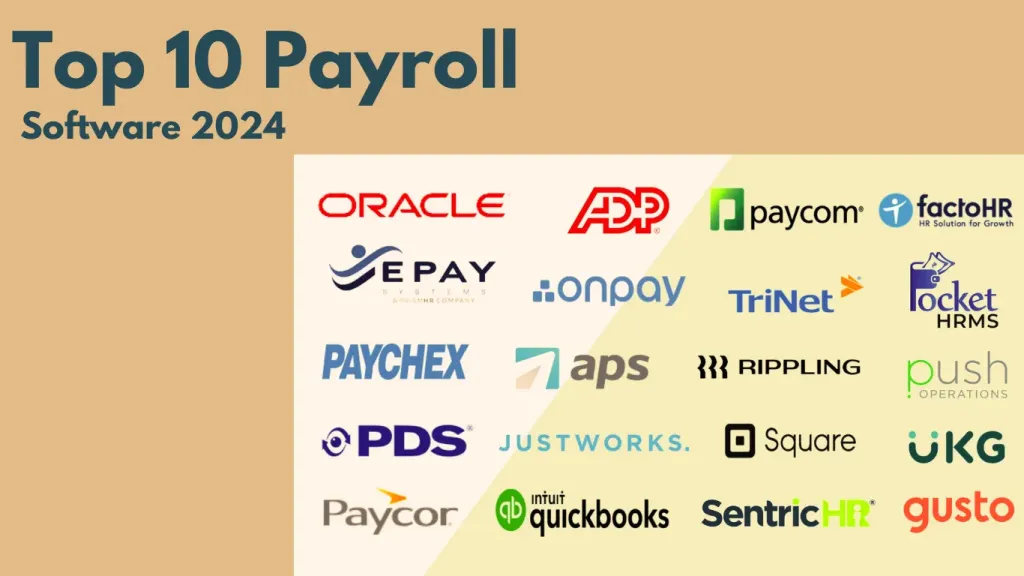
Below is a snapshot of widely recognized platforms that meet the criteria outlined above. Each offers a blend of automation, integration, and affordability.
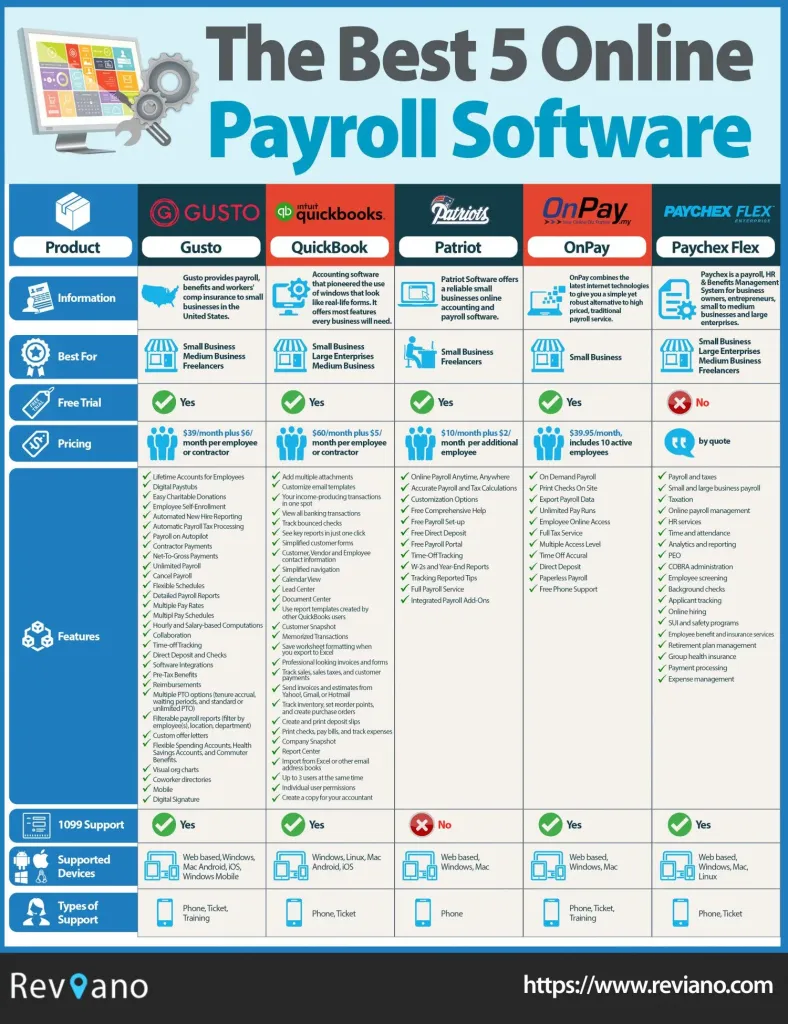
- Gusto: Known for its intuitive UI, Gusto provides full tax filing, benefits administration, and a robust employee portal. Pricing starts at $39/month plus $6 per employee.
- QuickBooks Online Payroll: Seamlessly integrates with QuickBooks accounting, offers auto‑tax filing, and supports both weekly and monthly pay cycles.
- OnPay: Offers unlimited payroll runs for a flat per‑employee fee and includes workers’ compensation tracking, ideal for businesses with fluctuating staff.
- Paychex Flex: Scalable solution with advanced reporting and HR modules, suitable for small businesses planning rapid growth.
- Patriot Software: Budget‑friendly option with essential payroll features and optional HR add‑ons for small teams.
While each platform has its strengths, the best choice hinges on your existing tech stack, budget, and specific payroll complexities. For businesses already leveraging an HR suite, the HR and payroll software for small business guide provides additional insights into integrated solutions.
Implementation Tips for a Smooth Transition

Switching to an online payroll system can be disruptive if not managed carefully. Follow these steps to minimize friction.
Plan a Data Migration Strategy
Begin by exporting current payroll data—employee details, tax withholdings, and historical pay records—in CSV format. Most vendors provide import templates; match your fields precisely to avoid errors. Conduct a parallel run where the new system processes a test payroll while the legacy system remains active.
Train Your Team Early
Schedule short training sessions for HR staff and managers on how to submit time entries, approve payroll, and generate reports. Provide employees with a quick guide to the self‑service portal, emphasizing how to view payslips and update personal information.
Set Up Compliance Alerts
Configure automatic reminders for filing deadlines, benefits enrollment periods, and wage‑law updates. Even though the software handles calculations, staying proactive ensures you never miss a statutory requirement.
Monitor the First Payroll Cycle Closely
During the inaugural run, double‑check every line item: gross wages, deductions, tax withholdings, and net pay. Compare the results with the previous manual payroll to confirm accuracy. Address any discrepancies immediately with the vendor’s support team.
Gather Feedback and Iterate
After the first few cycles, solicit feedback from both HR personnel and employees. Are there any features they find confusing? Is the portal responsive on mobile devices? Use this input to fine‑tune settings, adjust notifications, and optimize reporting dashboards.
Future Trends Shaping Online Payroll for Small Business
Technology continues to evolve, and payroll platforms are no exception. Keeping an eye on emerging trends can help small businesses stay ahead of the curve.
- Artificial Intelligence (AI) for Predictive Analytics: AI can forecast labor costs, identify overtime patterns, and suggest optimal staffing levels.
- Integrated HR Suites: More vendors are bundling payroll with performance management, recruiting, and benefits administration, creating a single source of truth for employee data.
- Blockchain for Payroll Transparency: Early adopters are experimenting with blockchain to provide immutable records of payroll transactions, enhancing trust.
- Global Payroll Capabilities: As remote work expands, solutions that support multi‑currency payroll and compliance across borders become increasingly valuable.
Adopting a forward‑looking platform ensures that your small business can adapt to these innovations without undergoing another costly migration in the near future.
In summary, choosing the right online payroll software for small business involves assessing your payroll complexity, ensuring seamless integration with existing tools, and prioritizing security and support. By focusing on automation, compliance, and employee self‑service, you can transform payroll from a monthly chore into a strategic asset that supports growth and employee satisfaction. Whether you select a dedicated payroll provider like Gusto or a fully integrated suite that combines HR and accounting, the key is to start small, test thoroughly, and scale responsibly. With the right system in place, you’ll free up time to concentrate on what truly matters: building your business.