Table of Contents
- Why Manufacturing Scheduling Software for Small Business Is No Longer Optional
- Core Features of Manufacturing Scheduling Software for Small Business
- Choosing the Right Solution: A Step‑by‑Step Checklist
- 1. Define Your Scheduling Objectives
- 2. Evaluate Cost Structure
- 3. Test Integration Capabilities
- 4. Assess Usability
- 5. Look for Support and Community
- Implementation Tips to Maximize ROI
- Start with a Pilot Line
- Map Existing Processes First
- Train on Real Data
- Monitor Early Metrics
- Case Study: A Small Metal Fabricator’s Journey
- Integrating Scheduling with Other Business Systems
- Future Trends: What Small Manufacturers Should Watch
- AI‑Driven Predictive Scheduling
- Cloud‑First Deployments
- IoT Integration
In the bustling world of small‑scale manufacturing, every minute on the shop floor counts. Owners often juggle order intake, inventory control, labor allocation, and equipment maintenance, all while trying to keep costs low and customers happy. When these moving parts are coordinated manually—using spreadsheets, whiteboards, or ad‑hoc notes—mistakes slip in, delays happen, and profit margins shrink.
Manufacturing scheduling software for small business offers a middle ground between the heavy‑duty systems designed for multinational plants and the rudimentary tools that small teams usually rely on. By providing a clear, real‑time view of production capacity, these solutions help businesses plan more accurately, react faster to change, and ultimately deliver products on time without overburdening limited resources.
Why Manufacturing Scheduling Software for Small Business Is No Longer Optional
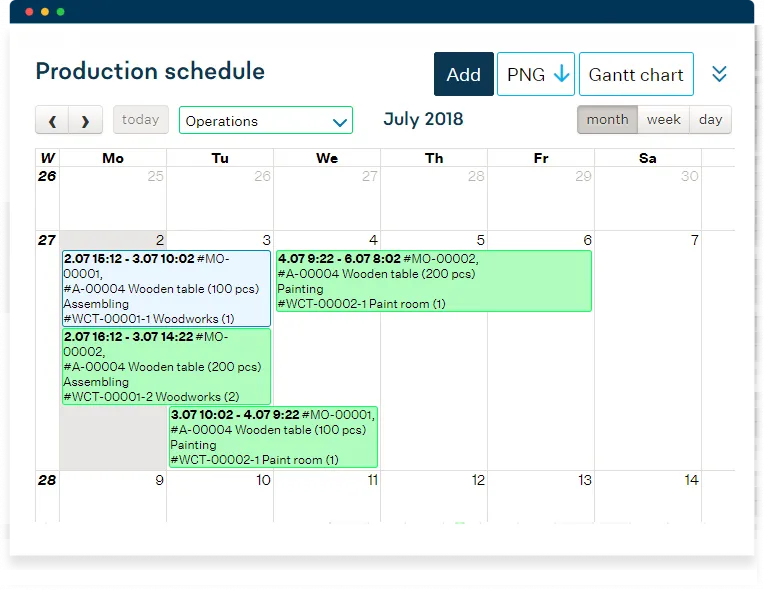
Small manufacturers face a unique set of pressures. They must stay flexible enough to take on custom orders while maintaining the efficiency needed to compete on price. Traditional enterprise resource planning (ERP) platforms often carry steep licensing fees, complex implementation cycles, and feature sets that exceed what a modest operation truly needs. Modern manufacturing scheduling software for small business, on the other hand, is built with affordability and ease of use in mind.
Key reasons that drive adoption include:
- Reduced lead times through automated sequencing of jobs.
- Improved inventory turnover by aligning material availability with production plans.
- Better labor utilization, preventing both idle time and overtime spikes.
- Visibility into bottlenecks, allowing managers to re‑allocate resources before a delay cascades.
Core Features of Manufacturing Scheduling Software for Small Business
While each vendor offers a slightly different mix, most solutions share a core set of capabilities that directly address the challenges faced by small manufacturers.
- Drag‑and‑drop scheduling board: Users can visually arrange jobs on a timeline, moving tasks between machines or workstations with a simple mouse action.
- Real‑time capacity tracking: The system continuously monitors machine availability, labor shifts, and material stock, flagging conflicts before they become costly.
- Order prioritization rules: Critical or rush orders can be automatically bumped ahead of routine production based on predefined criteria.
- Integration with shop‑floor data: Many tools connect to barcode scanners, IoT sensors, or simple PLC interfaces to capture actual start‑and‑finish times.
- Reporting and analytics: Built‑in dashboards highlight key performance indicators such as on‑time delivery rate, overall equipment effectiveness (OEE), and work‑in‑process (WIP) levels.
Choosing the Right Solution: A Step‑by‑Step Checklist
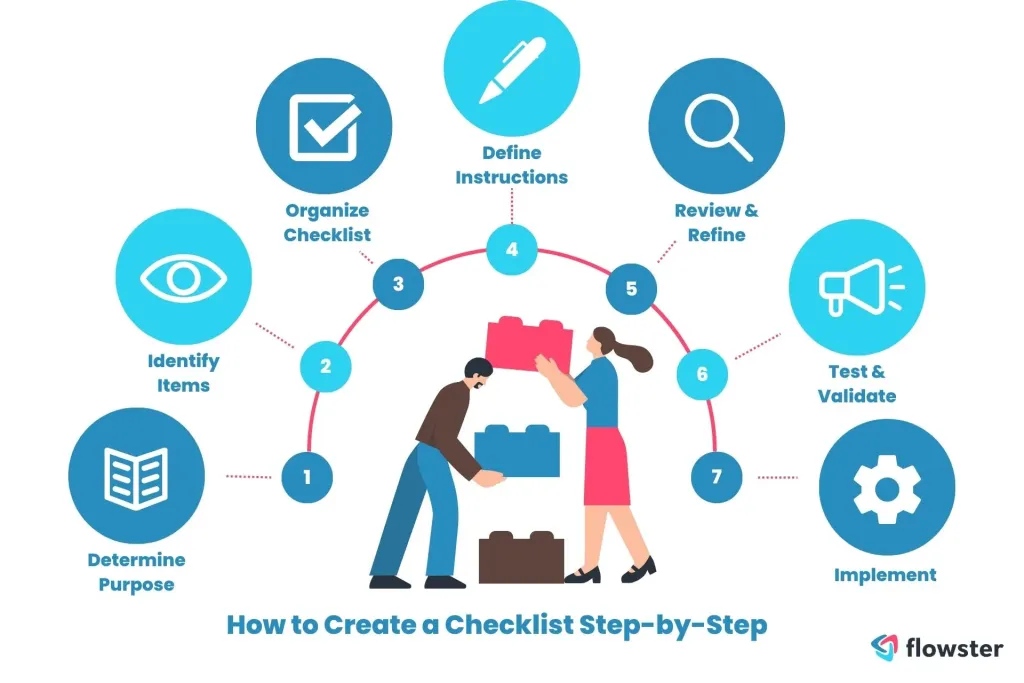
Selecting a platform that aligns with your business size and growth trajectory is crucial. Below is a practical checklist to guide the evaluation process.
1. Define Your Scheduling Objectives
Start by listing the problems you want the software to solve. Is it frequent missed delivery dates? Over‑stocked raw material? Unbalanced labor hours? Clear objectives help you compare features objectively and avoid paying for unnecessary modules.
2. Evaluate Cost Structure
Many vendors offer subscription‑based pricing that scales with the number of users or machines. For a small operation, a monthly fee that includes updates and support is often more manageable than a large upfront license.
3. Test Integration Capabilities
Even if you’re not ready to replace your entire ERP, the scheduling tool should speak to the systems you already use—be it accounting software, inventory management, or a basic CRM. For example, linking production schedules to Field Service Software that Integrates with QuickBooks can streamline invoicing and improve cash flow.
4. Assess Usability
Ask for a free trial and involve the people who will use the system daily—shop‑floor supervisors, planners, and even machine operators. A clean interface reduces training time and encourages adoption.
5. Look for Support and Community
Responsive customer support, a knowledge base, and an active user community can make a huge difference when you encounter a hiccup. Some providers also host webinars that focus on best practices for small manufacturers.
Implementation Tips to Maximize ROI

Even the best software can fall short if the rollout is rushed or poorly managed. Follow these guidelines to ensure a smooth transition.
Start with a Pilot Line
Instead of migrating the entire plant at once, select a single production line or product family to pilot the scheduling software. This controlled environment lets you fine‑tune parameters, train staff, and gather feedback without risking overall output.
Map Existing Processes First
Document the current workflow—from order receipt to shipment—before configuring the new system. Knowing where manual steps exist helps you design automated rules that truly reflect reality.
Train on Real Data
Load historical orders into the system during training sessions. Seeing how the software would have scheduled past jobs provides tangible proof of its benefits and helps users become comfortable with the interface.
Monitor Early Metrics
After the pilot, track key metrics such as average lead time, on‑time delivery percentage, and labor overtime hours. Even modest improvements—like a 5% reduction in lead time—can justify the investment and build momentum for a full‑scale rollout.
Case Study: A Small Metal Fabricator’s Journey

Consider a metal fabrication shop employing 15 people and running three CNC machines. Before adopting a scheduling solution, the owner relied on a spreadsheet that required manual updates each time a job was delayed. The result was frequent overtime, missed deadlines, and a 12% inventory surplus.
After implementing a cloud‑based manufacturing scheduling software for small business, the shop achieved the following within six months:
- Lead time decreased from 14 days to 10 days.
- Overtime hours fell by 30%, saving approximately $8,000 annually.
- Inventory levels aligned with production, reducing raw material holding costs by 15%.
- Customer satisfaction scores improved, leading to a 10% increase in repeat orders.
The owner attributes the transformation to the software’s real‑time capacity view and the ability to instantly re‑schedule jobs when a machine went down for maintenance.
Integrating Scheduling with Other Business Systems

Manufacturing scheduling software for small business does not operate in isolation. When paired with complementary tools, the overall efficiency gains multiply.
- Applicant Tracking Software for Small Business – A Practical Guide: Hiring the right operators becomes easier when you can forecast labor needs based on upcoming production plans.
- General Ledger Software for Small Business – A Complete Guide: Seamless integration ensures that labor costs captured in the schedule flow directly into financial statements, improving accuracy.
- Production Scheduling Software for Small Business – A Complete Guide: For businesses that need more advanced routing or batch management, exploring specialized production scheduling tools can be a logical next step.
Future Trends: What Small Manufacturers Should Watch
Technology evolves quickly, and even small manufacturers can benefit from emerging innovations.
AI‑Driven Predictive Scheduling
Machine‑learning algorithms analyze historical production data to predict potential delays, suggest optimal job sequences, and recommend preventive maintenance windows. Early adopters report up to a 20% boost in schedule adherence.
Cloud‑First Deployments
Software delivered as a service (SaaS) eliminates the need for on‑premise servers, reduces IT overhead, and allows instant access from any device—perfect for owners who split time between the shop floor and the office.
IoT Integration
Smart sensors on equipment can feed live status updates into the scheduling platform, providing an accurate picture of machine health, run times, and output rates. This real‑time data further refines the accuracy of the schedule.
Adopting these trends does not require a massive budget; many vendors now bundle AI insights and IoT connectors into their core offering, making advanced capabilities accessible to small businesses.
In summary, the right manufacturing scheduling software for small business can turn a chaotic production environment into a well‑orchestrated operation. By selecting a solution that fits budget, integrates with existing tools, and offers intuitive usability, owners can reduce lead times, cut overtime costs, and improve customer satisfaction. Starting with a pilot, training staff on real data, and continuously monitoring key performance indicators ensures that the investment pays off over time. As technology advances, staying informed about AI, cloud, and IoT enhancements will keep small manufacturers competitive without the need for costly, enterprise‑level systems.