Table of Contents
- Choosing the Right erp software for small manufacturing business
- Key features of erp software for small manufacturing business
- Evaluating Popular ERP Solutions for Small Manufacturers
- 1. NetSuite Manufacturing Edition
- 2. Odoo Manufacturing
- 3. Microsoft Dynamics 365 Business Central
- Implementation Best Practices
- Step 1 – Define Clear Objectives
- Step 2 – Assemble a Cross‑Functional Team
- Step 3 – Map Existing Processes
- Step 4 – Choose a Phased Rollout
- Step 5 – Invest in Training and Change Management
- Step 6 – Monitor, Refine, and Optimize
- Cost Considerations and ROI Calculation
- Common Pitfalls and How to Avoid Them
- Pitfall 1 – Over‑customization
- Pitfall 2 – Ignoring Data Quality
- Pitfall 3 – Underestimating Training Needs
- Pitfall 4 – Lack of Executive Sponsorship
- Future Trends: What’s Next for ERP in Small Manufacturing?
Running a small manufacturing operation involves juggling production schedules, inventory levels, order fulfillment, and financial reporting—all while keeping a close eye on profit margins. The pressure to stay competitive often forces owners to rely on spreadsheets, fragmented tools, and manual processes that can quickly become sources of error and delay. When a single mistake causes a production line to halt, the ripple effect touches every department, from procurement to customer service.
Enterprise Resource Planning (ERP) software promises to bring all these pieces together under one integrated platform. For a small manufacturing business, the right ERP system can turn chaos into a streamlined workflow, offering real‑time visibility, automated data capture, and the ability to scale as the company grows. This article explores the essential considerations, core functionalities, and practical steps to adopt ERP software for small manufacturing business successfully.
Below, we walk through the decision‑making process, highlight the features that matter most, and share implementation tips that minimize disruption. Whether you are evaluating your first ERP solution or looking to replace an outdated system, the guidance here is designed to help you make an informed choice.
Choosing the Right erp software for small manufacturing business
Selecting an ERP system is not a one‑size‑fits‑all exercise. Small manufacturers must assess their specific needs, budget constraints, and future growth plans. The following criteria provide a solid framework for evaluation:
- Industry focus: Look for solutions built with manufacturing processes in mind, such as bill of materials (BOM) management, shop floor control, and production scheduling.
- Scalability: The system should accommodate additional users, new product lines, and higher transaction volumes without requiring a complete overhaul.
- Deployment model: Cloud‑based ERP reduces upfront hardware costs and offers automatic updates, while on‑premise solutions may be preferable for companies with strict data‑security policies.
- Total cost of ownership: Consider licensing, implementation services, training, and ongoing support fees.
- Integration capabilities: The ERP must communicate smoothly with existing tools such as accounting software, CRM, or e‑commerce platforms.
Key features of erp software for small manufacturing business
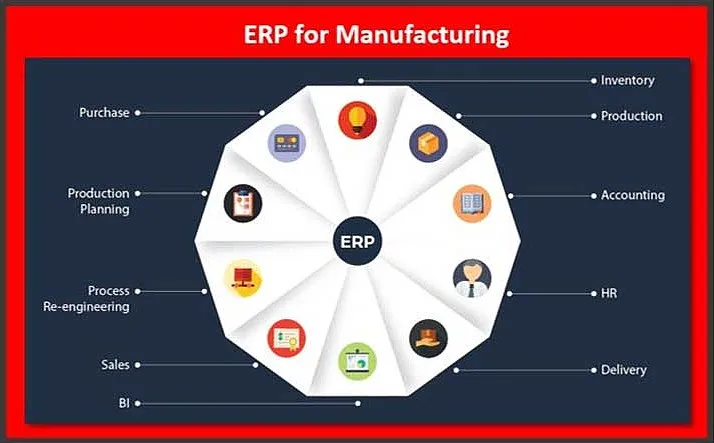
While every ERP package offers a core set of modules, the following functionalities are especially critical for small manufacturers:
- Inventory Management: Real‑time tracking of raw materials, work‑in‑process, and finished goods helps reduce stockouts and excess inventory.
- Production Planning & Scheduling: Ability to create, modify, and track work orders, allocate resources, and monitor shop floor performance.
- Quality Control: Integrated checklists and inspection records ensure that products meet specifications before shipment.
- Financial Management: General ledger, accounts payable, and accounts receivable modules that align production costs with accounting data.
- Customer Relationship Management (CRM): Centralized view of orders, quotes, and communication to improve order accuracy and customer satisfaction.
Many modern ERP platforms also include analytics dashboards that turn operational data into actionable insights. For instance, a dashboard might highlight bottlenecks in the production line, enabling managers to reallocate labor or equipment before delays become costly.
Evaluating Popular ERP Solutions for Small Manufacturers
Below is a brief overview of three ERP options that have gained traction among small manufacturing firms. Each solution balances functionality with affordability, making them suitable for businesses with limited IT resources.
1. NetSuite Manufacturing Edition
NetSuite offers a cloud‑based suite that integrates ERP, CRM, and e‑commerce. Its manufacturing module supports discrete and process manufacturing, with tools for demand planning, work order management, and shop floor control. The subscription pricing model aligns with the cash‑flow realities of small businesses.
2. Odoo Manufacturing
Odoo is an open‑source ERP that can be customized extensively. The manufacturing app provides BOM management, routing, and real‑time inventory updates. Because the core platform is free, costs are primarily associated with hosting and optional support contracts.
3. Microsoft Dynamics 365 Business Central
Business Central delivers a familiar Microsoft interface and strong integration with Office 365. Its manufacturing capabilities include job costing, capacity planning, and lean production tools. Small manufacturers appreciate the modular licensing, which allows them to start with essential features and add more later.
When comparing these solutions, consider factors such as implementation time, user interface simplicity, and the availability of local partners who can provide hands‑on assistance.
Implementation Best Practices

Adopting ERP software for small manufacturing business is a multi‑phase project that requires careful planning. Below are proven steps that help ensure a smooth transition.
Step 1 – Define Clear Objectives
Identify the top three problems you expect the ERP to solve, whether it’s reducing inventory carrying costs, improving order fulfillment speed, or gaining better cost visibility. Documenting these goals creates a benchmark for measuring success.
Step 2 – Assemble a Cross‑Functional Team
Include representatives from production, finance, sales, and IT. A diverse team ensures that the system meets the needs of each department and encourages user adoption.
Step 3 – Map Existing Processes
Before configuring the ERP, create detailed flowcharts of current workflows. Highlight pain points and redundancies; the ERP should be configured to eliminate, not replicate, these inefficiencies.
Step 4 – Choose a Phased Rollout
Start with a pilot module—often inventory or financials—before expanding to production planning. A phased approach reduces risk and gives users time to become comfortable with the new interface.
Step 5 – Invest in Training and Change Management
Even the most intuitive ERP requires training. Offer role‑based sessions, develop quick‑reference guides, and appoint “super users” who can support their peers. Communicating the benefits of the ERP early helps mitigate resistance.
Step 6 – Monitor, Refine, and Optimize
After go‑live, track key performance indicators (KPIs) such as order lead time, inventory turnover, and production variance. Use the ERP’s reporting tools to spot trends and adjust processes accordingly.
For businesses that also manage complex contracts or legal documentation, pairing the ERP with a contract management software for legal departments can further streamline compliance and reduce manual paperwork.
Cost Considerations and ROI Calculation
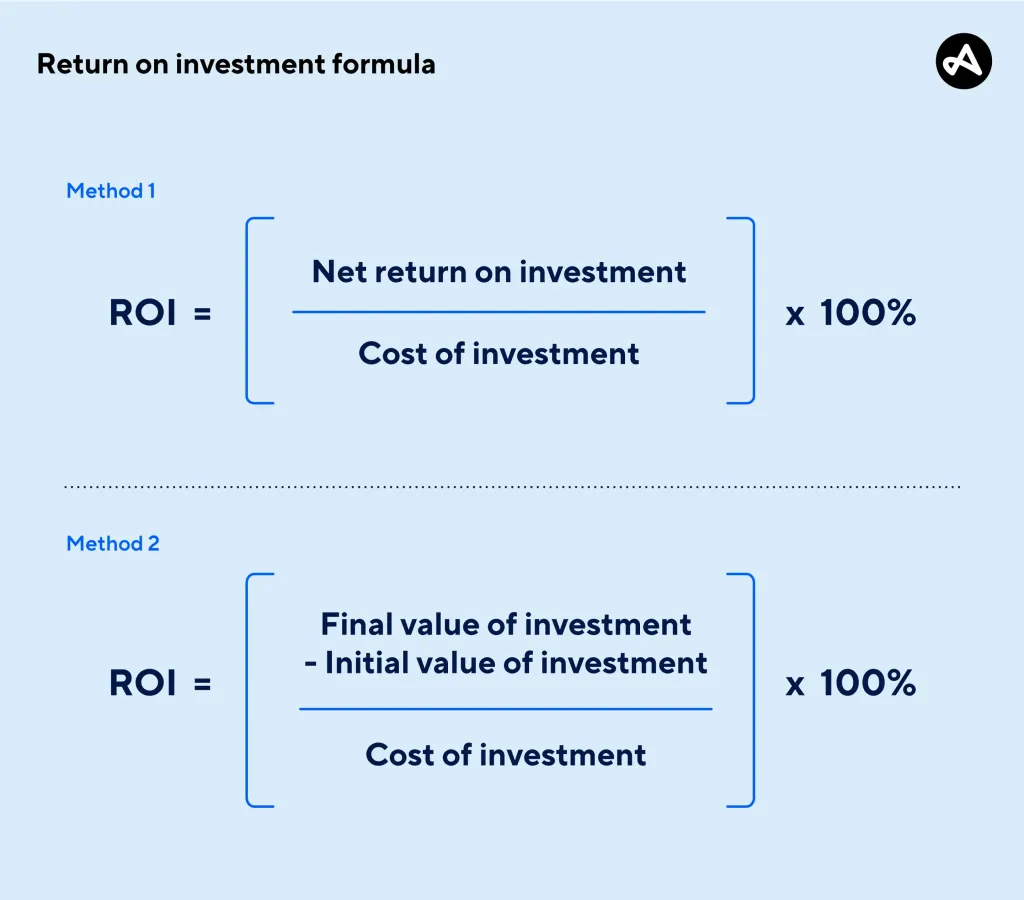
Understanding the financial impact of ERP software for small manufacturing business is essential for securing stakeholder buy‑in. While the initial outlay may include licensing, consulting, data migration, and training, the long‑term benefits often outweigh these expenses.
- Reduced labor costs: Automation of data entry and inventory counts cuts down on manual hours.
- Lower inventory carrying costs: Accurate demand forecasting prevents over‑stocking.
- Improved cash flow: Faster invoicing and better visibility into receivables accelerate collections.
- Decreased scrap and rework: Integrated quality control reduces defects.
To calculate ROI, compare the total cost of ownership over a three‑year horizon with the estimated annual savings from each of the above categories. A typical small manufacturer can see a 15‑25% reduction in operating expenses within the first year of ERP adoption.
Common Pitfalls and How to Avoid Them

Even with careful planning, small manufacturers can encounter obstacles that hinder ERP success. Recognizing these pitfalls early helps keep projects on track.
Pitfall 1 – Over‑customization
Excessive tailoring can make future upgrades difficult and increase maintenance costs. Aim for configuration over customization wherever possible.
Pitfall 2 – Ignoring Data Quality
Garbage in, garbage out. Conduct a thorough data cleanse before migration to ensure that the ERP starts with accurate master data.
Pitfall 3 – Underestimating Training Needs
Assuming that users will pick up the system on their own leads to low adoption rates. Allocate sufficient budget and time for comprehensive training programs.
Pitfall 4 – Lack of Executive Sponsorship
Executive leadership must champion the initiative, allocate resources, and reinforce its strategic importance across the organization.
Addressing these challenges proactively can dramatically increase the likelihood of a successful ERP rollout.
Future Trends: What’s Next for ERP in Small Manufacturing?
Technology continues to evolve, and ERP systems are no exception. Small manufacturers should keep an eye on emerging trends that could further enhance operational efficiency.
- Artificial Intelligence (AI) and Machine Learning: Predictive analytics can forecast demand spikes, suggest optimal production schedules, and flag potential equipment failures before they happen.
- Internet of Things (IoT) Integration: Sensors on machinery feed real‑time data into the ERP, enabling dynamic adjustments to workflow and maintenance planning.
- Mobile-First Interfaces: Tablets and smartphones allow supervisors to monitor shop floor performance from anywhere, increasing responsiveness.
- Modular “Best‑of‑Breed” Ecosystems: Companies can combine a core ERP with specialized add‑ons—such as a HR and payroll software for small business—to create a tailored tech stack.
Adopting a flexible ERP platform now positions a small manufacturing business to take advantage of these innovations without massive system overhauls.
In summary, implementing ERP software for small manufacturing business can transform fragmented operations into a cohesive, data‑driven enterprise. By carefully selecting a solution that matches industry needs, following proven implementation steps, and staying vigilant about common pitfalls, manufacturers can achieve measurable cost savings, higher productivity, and a solid foundation for future growth. The journey may require investment of time and resources, but the payoff—enhanced visibility, streamlined processes, and the ability to scale—makes ERP an essential strategic tool for any small manufacturing operation.