Table of Contents
- Why Choose Help Desk Software as a Service?
- Cost Efficiency of Help Desk Software as a Service
- Scalability and Flexibility
- Integration with Existing Business Tools
- Key Features to Expect from a Modern Help Desk SaaS Platform
- Implementation Best Practices for Help Desk Software as a Service
- Define Clear Objectives and Success Metrics
- Map Existing Processes to the New Platform
- Engage Stakeholders Early
- Leverage Training Resources and Sandbox Environments
- Plan a Phased Rollout
- Security and Compliance Considerations
- Measuring ROI and Continuous Improvement
- Future Trends Shaping Help Desk Software as a Service
- Artificial Intelligence and Predictive Support
- Unified Customer Experience Platforms
- Hyper‑Personalization Through Data Enrichment
In today’s hyper‑connected business environment, the ability to resolve customer and employee issues quickly is no longer a competitive edge—it is a necessity. Traditional on‑premise ticketing systems, while once the norm, often struggle to keep pace with the speed of modern communication channels, the demand for remote access, and the need for seamless integration with other business tools. This gap has paved the way for a new generation of solutions: help desk software as a service.
Unlike legacy installations that require dedicated servers, regular patch cycles, and a team of IT specialists, a cloud‑based help desk delivers the same core functionalities—ticket management, knowledge bases, automation, and reporting—through a subscription model. Organizations can start small, scale up as needs evolve, and benefit from continuous updates without the overhead of hardware maintenance.
For small businesses especially, the financial and operational advantages of a SaaS‑based help desk are compelling. It eliminates large upfront capital expenditures, reduces the burden on internal IT staff, and offers a predictable monthly cost structure. Moreover, the flexibility of cloud access means support agents can work from anywhere, a feature that aligns perfectly with the rise of remote work.
Why Choose Help Desk Software as a Service?
The decision to adopt help desk software as a service often rests on three fundamental pillars: cost efficiency, scalability, and integration capability. Each pillar addresses a specific pain point that organizations face when managing support processes.
Cost Efficiency of Help Desk Software as a Service
- Predictable Subscription Fees: Instead of a large upfront license purchase, businesses pay a recurring fee that covers hosting, maintenance, and upgrades.
- Reduced IT Overhead: The provider handles server upkeep, security patches, and backup strategies, freeing internal teams to focus on core activities.
- Pay‑as‑You‑Grow Pricing: Most SaaS platforms allow you to add agents or modules incrementally, ensuring you only pay for what you use.
When budgeting for support tools, it is useful to compare the total cost of ownership (TCO) of on‑premise solutions versus a SaaS model. A recent benchmark study showed that organizations that switched to help desk software as a service reduced their TCO by up to 40 percent within the first year.
Scalability and Flexibility
Growth spikes—whether seasonal, product‑launch driven, or caused by rapid market expansion—can overwhelm static support infrastructures. A cloud‑based help desk automatically provisions additional resources, ensuring response times remain stable. Likewise, if a company contracts or restructures, it can scale down without incurring sunk costs.
Another advantage is multi‑tenant architecture, which isolates each customer’s data while sharing the underlying infrastructure. This design provides both security and the ability to roll out new features to all clients simultaneously, guaranteeing that every user benefits from the latest improvements.
Integration with Existing Business Tools
Modern support environments rarely operate in isolation. They need to pull data from CRM platforms, accounting software, and field service applications to deliver context‑rich assistance. Help desk software as a service typically offers RESTful APIs, pre‑built connectors, and marketplace apps that bridge these gaps.
For example, a company that already uses field service software that integrates with QuickBooks can link its ticketing system directly to job orders, allowing agents to view asset histories while resolving issues. Similarly, integrating with a general ledger software for small business can automate expense tracking for support-related purchases.
Key Features to Expect from a Modern Help Desk SaaS Platform
While the core purpose of any help desk remains the same—capturing, tracking, and resolving inquiries—the cloud delivery model introduces enhancements that improve both agent productivity and customer satisfaction.
- Omni‑Channel Ticketing: Consolidates emails, phone calls, live chat, social media messages, and even SMS into a single unified queue.
- Self‑Service Knowledge Base: Allows users to find answers instantly, reducing ticket volume and freeing agents for more complex problems.
- Automation & Workflows: Rules‑based routing, SLA enforcement, and macro actions accelerate resolution times.
- AI‑Powered Suggestions: Machine‑learning models propose relevant articles or similar past tickets as agents type, cutting handling time.
- Robust Reporting & Analytics: Dashboards show ticket trends, agent performance, and customer satisfaction scores (CSAT), guiding continuous improvement.
- Mobile Apps: Enable agents to respond to tickets on the go, an essential feature for distributed teams.
When evaluating vendors, it is important to verify that each of these capabilities aligns with your organization’s workflow. Some platforms specialize in AI-driven insights, while others focus on deep integrations with specific ERP or HR systems.
Implementation Best Practices for Help Desk Software as a Service
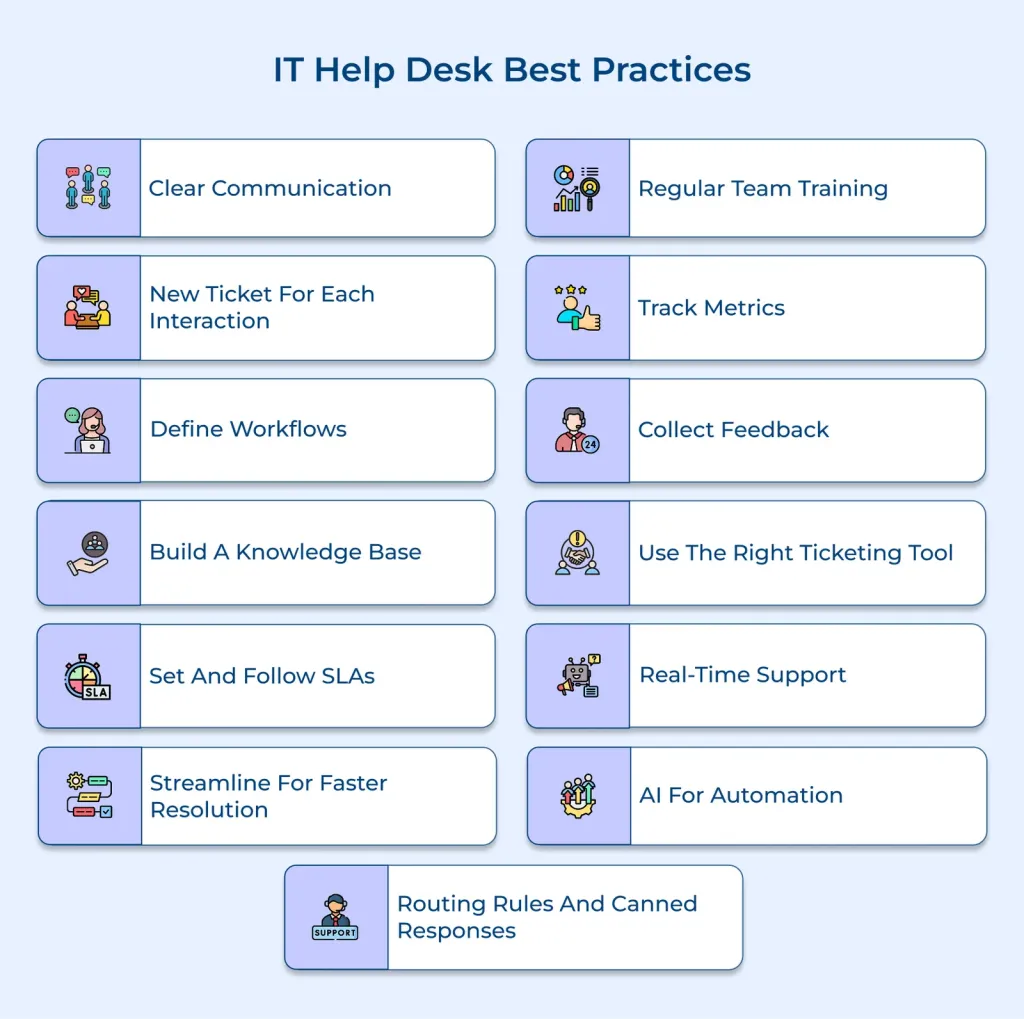
Adopting a new help desk system, even a cloud‑based one, requires careful planning to avoid disruption and to maximize return on investment. Below are proven steps that smooth the transition.
Define Clear Objectives and Success Metrics
Start by articulating what you hope to achieve—faster first‑response times, higher CSAT scores, reduced ticket backlog, or lower operating costs. Establish measurable KPIs such as average resolution time, ticket deflection rate, and agent utilization. These metrics will serve as benchmarks throughout the rollout.
Map Existing Processes to the New Platform
Document current ticket flows, escalation paths, and SLA definitions. Then compare them against the workflow engine of the chosen SaaS solution. Adjustments may be needed, but preserving essential processes ensures continuity for both agents and customers.
Engage Stakeholders Early
Involve frontline support staff, IT administrators, and even frequent customers in the selection and configuration phases. Their feedback helps tailor the system to real‑world usage and fosters early buy‑in, which is critical for adoption.
Leverage Training Resources and Sandbox Environments
Most help desk software as a service vendors provide on‑demand tutorials, webinars, and a test environment. Encourage agents to experiment with ticket routing, macro creation, and reporting before going live. A well‑trained team reduces the learning curve and minimizes support errors.
Plan a Phased Rollout
Rather than switching over all users at once, consider a pilot with a single department or product line. Monitor performance, gather feedback, and refine configurations before scaling organization‑wide. This approach mitigates risk and allows for iterative improvements.
Security and Compliance Considerations

Since help desk software as a service stores potentially sensitive information—customer data, internal process details, and sometimes financial records—security cannot be an afterthought. Look for providers that demonstrate compliance with standards such as ISO 27001, SOC 2, and GDPR (if you handle EU data).
Key security features to verify include:
- Data encryption at rest and in transit
- Role‑based access control (RBAC)
- Multi‑factor authentication (MFA) for admin accounts
- Regular penetration testing and vulnerability assessments
- Clear data residency options for regions with strict regulations
Additionally, review the vendor’s data retention policy and backup procedures. Knowing how quickly you can recover tickets after a disaster is essential for maintaining service continuity.
Measuring ROI and Continuous Improvement
After the system is fully operational, return to the KPIs defined during the planning stage. Compare pre‑implementation baselines with post‑implementation results. Common areas where businesses see measurable gains include:
- 30‑40% reduction in average handling time due to automation and AI suggestions
- Improved first‑contact resolution rates, leading to higher customer loyalty
- Lower operational costs thanks to reduced hardware maintenance and fewer required support staff per ticket volume
Use the analytics dashboards to identify bottlenecks—perhaps a particular issue type consistently breaches SLA thresholds. Adjust routing rules, enhance knowledge‑base articles, or provide additional agent training to address these gaps.
Future Trends Shaping Help Desk Software as a Service

The SaaS model itself continues to evolve, and emerging technologies are being woven into the fabric of modern help desks.
Artificial Intelligence and Predictive Support
Beyond simple suggestion engines, AI is now capable of predicting ticket surges based on product release cycles or historical patterns, allowing teams to pre‑emptively allocate resources.
Unified Customer Experience Platforms
Vendors are consolidating CRM, chat, and support functions into a single interface, reducing context switching and providing a holistic view of the customer journey.
Hyper‑Personalization Through Data Enrichment
Integrating third‑party data sources—like usage analytics or subscription history—enables agents to tailor responses instantly, increasing the perceived value of each interaction.
Staying aware of these trends helps organizations choose a platform that will not only meet current needs but also adapt to future expectations.
In summary, help desk software as a service offers a compelling combination of cost savings, scalability, and integration power that aligns with the demands of modern businesses. By selecting a solution that matches your operational goals, following proven implementation practices, and continuously monitoring performance, you can transform support from a cost center into a strategic advantage. The cloud‑native architecture ensures that as your organization grows—or as the market shifts—your help desk remains flexible, secure, and ready to deliver the high‑quality assistance that today’s customers expect.