Table of Contents
- Key Benefits of Easy Payroll Software for Small Business
- Accuracy that Reduces Human Error
- Efficiency that Saves Valuable Time
- Compliance that Keeps You Out of Trouble
- Choosing Easy Payroll Software for Small Business: What to Look For
- Scalability and Pricing Structure
- User‑Friendly Interface
- Integration Capabilities
- Customer Support and Resources
- Security and Data Protection
- Top Easy Payroll Software Options for Small Business
- Gusto
- QuickBooks Payroll
- OnPay
- Paychex Flex
- Implementation Tips to Maximize Ease
- Gather Accurate Employee Data Early
- Run a Parallel Test Payroll
- Train Staff and Document Processes
- Leverage Support Resources
- Future‑Proofing Your Payroll Strategy
- Automation and AI Features
- Mobile Accessibility
- Regulatory Updates
Running a small business often feels like juggling multiple roles at once. From managing inventory to handling customer service, the owner wears many hats. One of the most critical yet time‑consuming tasks is payroll. Mistakes in calculating wages, taxes, or benefits can lead to penalties and dissatisfied employees. That is why many owners turn to easy payroll software for small business, a tool designed to automate calculations, keep records straight, and stay compliant with ever‑changing regulations.
Imagine a scenario where the owner can spend a few minutes each month entering hours, reviewing a clear summary, and clicking “process.” The software takes care of withholding taxes, generating pay stubs, and filing required reports. This narrative is no longer a distant dream; it is a reality for countless entrepreneurs who have adopted modern payroll solutions. In the following sections, we will explore the core features that make payroll software truly easy, outline criteria for selecting the right system, and highlight a few options that fit the budget and needs of a typical small business.
Key Benefits of Easy Payroll Software for Small Business
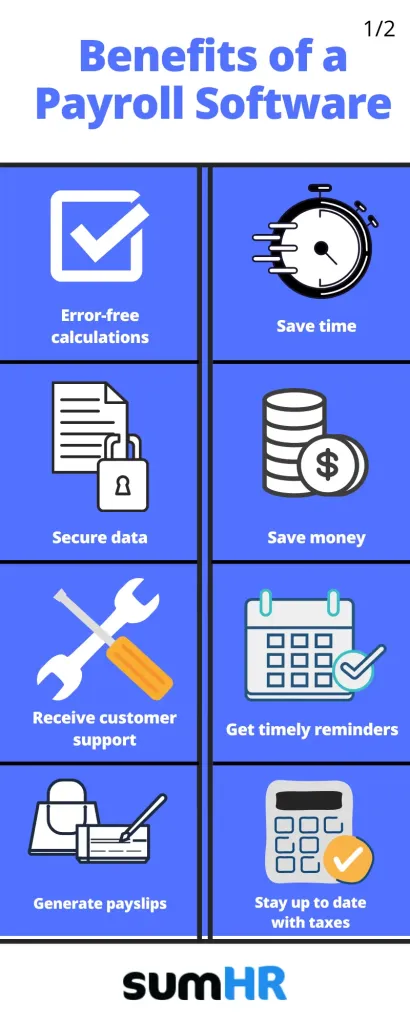
When evaluating any technology, the first question is usually “what problem does it solve?” Easy payroll software for small business addresses three primary pain points: accuracy, efficiency, and compliance.
Accuracy that Reduces Human Error
Manual calculations are prone to simple arithmetic mistakes, especially when overtime, bonuses, or multiple tax jurisdictions are involved. An automated system cross‑checks each entry against the latest tax tables, ensuring that every paycheck reflects the correct amount. This level of precision is essential for maintaining trust with employees and avoiding costly corrections.
Efficiency that Saves Valuable Time
Time spent on payroll can quickly add up. A typical small‑business owner might spend several hours each pay period gathering timesheets, entering data, and reconciling accounts. Easy payroll software for small business streamlines these steps into a few clicks. Integration with time‑tracking tools, direct deposit capabilities, and batch processing further compress the workflow, allowing owners to focus on growth‑related activities.
Compliance that Keeps You Out of Trouble
Payroll regulations evolve constantly. Federal, state, and local tax rates change, new filing deadlines appear, and wage‑hour laws get updated. A reliable payroll platform automatically updates its tax tables and compliance rules, generating the necessary forms such as W‑2s, 1099s, and quarterly tax filings. This built‑in compliance shield reduces the risk of penalties and audits.
Choosing Easy Payroll Software for Small Business: What to Look For
Selecting a solution is not a one‑size‑fits‑all decision. The right software should align with the business’s size, industry, and future plans. Below are the most important criteria to consider.
Scalability and Pricing Structure
Most small businesses start with a handful of employees but anticipate growth. Look for a platform that offers tiered pricing based on employee count, with the ability to add users without steep price jumps. Transparent, subscription‑based pricing helps avoid surprise fees.
User‑Friendly Interface
An intuitive dashboard reduces the learning curve. Features such as drag‑and‑drop employee onboarding, clear navigation menus, and helpful tooltips empower owners and non‑technical staff to manage payroll without extensive training.
Integration Capabilities
Payroll does not operate in isolation. Seamless integration with accounting software (e.g., QuickBooks, Xero), time‑tracking apps, and HR management tools creates a unified ecosystem. When data flows automatically between systems, duplicate entry is eliminated, and financial reporting becomes more accurate.
Customer Support and Resources
Even the most straightforward platform may raise questions. Look for providers that offer multiple support channels—phone, live chat, email—and a comprehensive knowledge base. Some vendors also provide webinars and step‑by‑step guides that help users maximize the software’s potential.
Security and Data Protection
Payroll data includes sensitive personal and financial information. Ensure the software follows industry‑standard encryption, regular security audits, and complies with regulations such as GDPR or CCPA where applicable.
For businesses that also need custom development or integration, partnering with a Ruby on Rails Software Development Company can provide tailored solutions that mesh perfectly with existing workflows.
Top Easy Payroll Software Options for Small Business
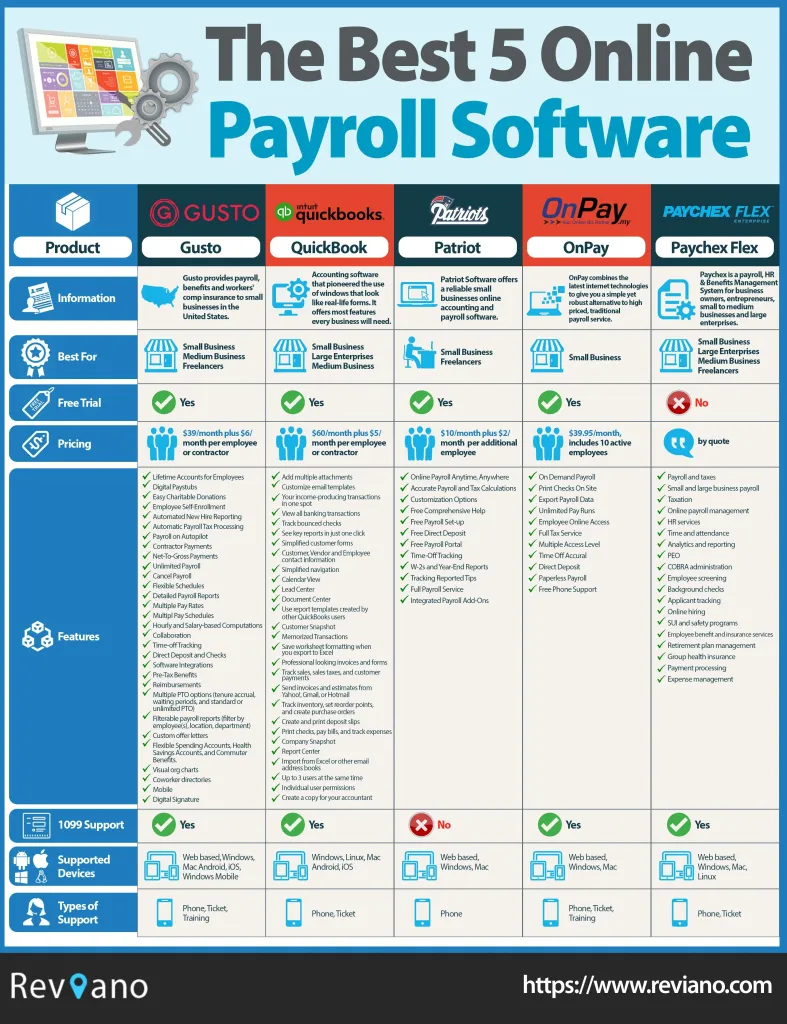
Below is a shortlist of well‑known platforms that consistently receive high marks for usability, compliance, and value. Each offers a free trial, allowing owners to test the system before committing.
Gusto
Gusto combines payroll with HR tools such as benefits administration and employee onboarding. Its clean interface makes it easy to run payroll in minutes, and automatic tax filing is included in most plans.
QuickBooks Payroll
Designed for businesses already using QuickBooks accounting, this solution syncs payroll data directly into the general ledger. It offers both basic and full‑service options, catering to varying levels of automation.
OnPay
OnPay is praised for its simplicity and transparent pricing. It supports multiple pay schedules, contractor payments, and integrates with popular time‑tracking apps.
Paychex Flex
Paychex Flex provides a robust set of features, including HR compliance tools and a mobile app for on‑the‑go payroll processing. It is suitable for businesses that anticipate rapid expansion.
Implementation Tips to Maximize Ease

Adopting easy payroll software for small business is only half the journey. Proper implementation ensures the tool delivers its promised benefits.
Gather Accurate Employee Data Early
Before launching the software, verify that all employee records—social security numbers, tax withholding choices, and benefit elections—are up to date. Importing clean data reduces the need for later corrections.
Run a Parallel Test Payroll
Conduct a test run using the previous month’s data while keeping the payroll on hold. Compare the software’s calculations with your historical records. Any discrepancies can be addressed before the first live payroll.
Train Staff and Document Processes
Even though the system is designed to be user‑friendly, a brief training session helps staff understand how to enter hours, approve timesheets, and generate reports. Maintaining a simple SOP (Standard Operating Procedure) document ensures consistency.
Leverage Support Resources
Take advantage of vendor webinars, FAQs, and community forums. If you encounter a unique scenario, such as multi‑state tax obligations, reaching out to support early can prevent costly errors.
Future‑Proofing Your Payroll Strategy

Technology evolves rapidly, and payroll software is no exception. Small businesses should consider how the chosen platform will adapt to future needs.
Automation and AI Features
Some providers are introducing AI‑driven insights, such as predictive cash‑flow forecasts based on payroll trends. While not essential today, these features can become valuable as the business scales.
Mobile Accessibility
Having a mobile app means owners can approve payroll or view reports from anywhere, a convenience that aligns with the increasingly remote nature of work.
Regulatory Updates
Ensure the vendor has a track record of rolling out updates promptly. This is especially important for industries with specific compliance requirements, such as contractors who might also benefit from Field Service Software for Electrical Contractors – Boosting Productivity.
By selecting a platform that embraces continuous improvement, small businesses can protect their payroll processes against future regulatory shifts and technological disruptions.
In summary, easy payroll software for small business transforms a traditionally cumbersome task into a streamlined, reliable operation. The right solution delivers accuracy, saves time, and safeguards compliance, all while scaling alongside the company’s growth. By focusing on key selection criteria—such as pricing, integration, and support—owners can choose a system that fits their current needs and positions them for future success. Implementing the software with careful data preparation, testing, and staff training ensures a smooth transition. As the business evolves, staying attuned to new features like AI insights and mobile access will keep the payroll process efficient and adaptable.