Table of Contents
- Why time and billing software for law firms is essential
- How time and billing software for law firms improves profitability
- Key features to look for in time and billing software for law firms
- Real‑time time capture
- Automated billing rules
- Integration capabilities
- Client portal and self‑service invoicing
- Reporting and analytics
- Choosing the right vendor: a step‑by‑step approach
- Define firm‑wide requirements
- Shortlist based on feature match
- Request demos and trial periods
- Assess security and compliance
- Calculate total cost of ownership
- Implementation best practices
- Start with a pilot group
- Provide comprehensive training
- Maintain data integrity during migration
- Establish clear policies
- Monitor adoption and adjust
- Future trends shaping time and billing software for law firms
- Artificial intelligence and predictive analytics
- Mobile‑first design
- Integration with e‑discovery and document‑review platforms
- Enhanced client communication tools
Running a law firm today involves more than just legal expertise; it requires precise management of every minute spent on a case and meticulous billing to ensure the firm remains profitable. Traditional spreadsheets and manual time‑keeping quickly become sources of error, lost revenue, and client frustration. The rise of dedicated time and billing software for law firms offers a practical solution, automating the capture of billable hours and generating accurate invoices with just a few clicks.
Adopting the right technology not only reduces administrative overhead but also provides insight into how attorneys allocate their time, which matters for strategic planning and resource allocation. When a firm can reliably track each task—from client consultations to courtroom appearances—it gains the ability to evaluate performance, forecast cash flow, and ultimately deliver better service to its clients.
In this article we will explore the essential features of time and billing software for law firms, discuss how to evaluate vendors, and outline best practices for successful implementation. Whether you are a solo practitioner or part of a mid‑size firm, the principles outlined here can help you make an informed decision.
Why time and billing software for law firms is essential
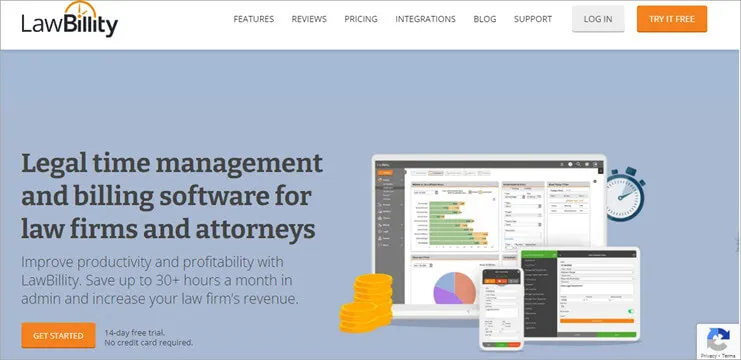
The legal industry operates on a billable‑hour model in many practice areas, making accurate time capture a cornerstone of revenue generation. Manual methods often lead to:
- Missed or inaccurate entries, resulting in lost billable hours.
- Time‑consuming invoice preparation that delays cash flow.
- Compliance risks, especially when handling retainers, trust accounts, or client‑specific billing arrangements.
Time and billing software for law firms addresses these challenges by providing a centralized platform where attorneys can record their activities in real time, apply appropriate billing rates, and generate invoices that meet both firm policies and client expectations. The automation also supports ethical compliance, as most jurisdictions require detailed records of time spent on client matters.
How time and billing software for law firms improves profitability
When attorneys use a dedicated system, firms gain visibility into utilization rates—the proportion of time spent on billable work versus non‑billable tasks. This metric helps partners identify under‑utilized resources and adjust workloads accordingly. Moreover, built‑in reporting tools can highlight high‑margin matters, allowing firms to focus marketing efforts on the most lucrative practice areas.
Integration with accounting platforms further streamlines financial management. For example, linking time and billing software for law firms with a general ledger system ensures that revenue is posted accurately, reducing the need for manual journal entries and minimizing the risk of discrepancies. A firm that previously spent hours reconciling spreadsheets can now rely on real‑time data that feeds directly into its accounting suite.
Key features to look for in time and billing software for law firms

Not all solutions are created equal. Below are the critical capabilities that distinguish a robust time and billing system from a basic timer app.
Real‑time time capture
Lawyers should be able to start, pause, and stop timers directly from a desktop or mobile device. The system must support activity codes, matter codes, and client codes so each entry is automatically categorized for reporting and billing purposes.
Automated billing rules
Effective time and billing software for law firms allows firms to define complex billing rules—such as incremental rounding, flat‑fee arrangements, or blended rates—without manual adjustments. When an invoice is generated, the system applies these rules consistently, eliminating errors caused by human calculation.
Integration capabilities
Seamless connectivity with practice‑management, document‑management, and accounting platforms is essential. Integration with popular tools like QuickBooks, Xero, or specialized legal ERP solutions ensures that data flows smoothly across the firm’s technology stack. Firms that have already invested in general ledger software for small business will benefit from a time and billing system that can push revenue entries directly into their ledger.
Client portal and self‑service invoicing
Modern clients expect transparency. A client portal that displays time entries, invoice status, and payment options improves satisfaction and can accelerate collections. Some platforms even allow clients to dispute entries directly within the portal, reducing back‑and‑forth email chains.
Reporting and analytics
Beyond basic invoicing, firms need dashboards that illustrate utilization, realization rates, and matter profitability. Advanced analytics can surface trends such as the average time required for specific case types, helping firms refine their pricing strategies.
Choosing the right vendor: a step‑by‑step approach
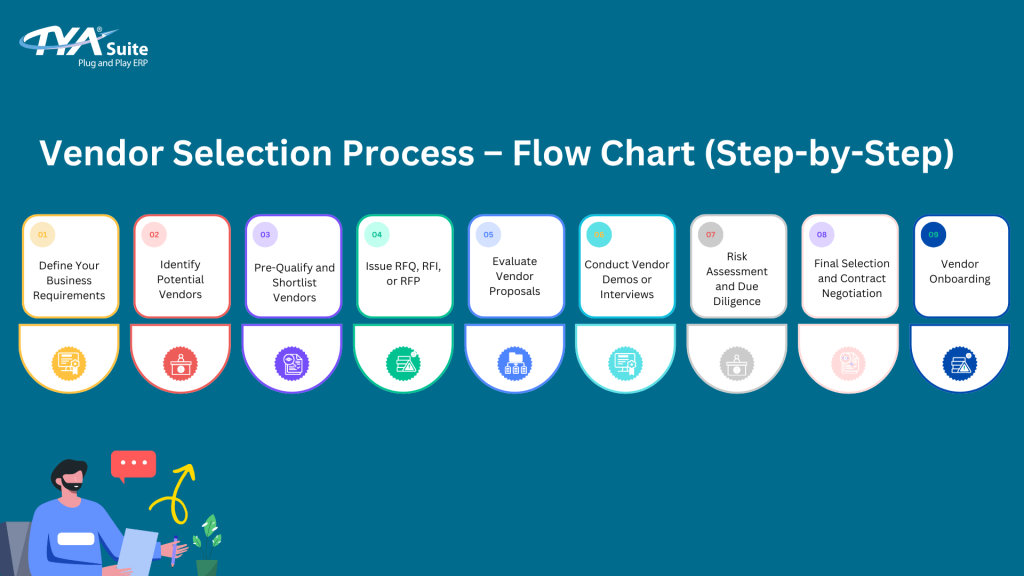
Selecting a time and billing solution is a strategic decision that should involve both the firm’s leadership and its end users. Follow these steps to ensure a thorough evaluation.
Define firm‑wide requirements
Begin by mapping out the firm’s current workflow: how attorneys record time, who reviews entries, how invoices are approved, and what reporting needs exist. This inventory will become the baseline against which each vendor is measured.
Shortlist based on feature match
Use the feature list above as a checklist. Prioritize solutions that offer real‑time capture, robust billing rules, and strong integration options. Ensure the vendor provides a cloud‑based version if remote access is a priority.
Request demos and trial periods
Seeing the software in action is crucial. During a demo, ask to see how the system handles a typical matter—from time entry to invoice generation. Take advantage of trial periods to let attorneys test the interface. Ease of use often determines adoption rates.
Assess security and compliance
Law firms handle confidential client data, so the platform must meet industry‑standard security protocols: encryption at rest and in transit, role‑based access controls, and regular third‑party audits. Verify that the solution complies with any jurisdictional rules that apply to your practice.
Calculate total cost of ownership
Beyond the subscription fee, consider implementation costs, training, and potential integration expenses. Some vendors offer bundled packages that include support for document‑management integration or custom reporting—these can reduce overall spend.
Implementation best practices

Even the best time and billing software for law firms can fall short if the rollout is mishandled. Below are proven tactics to smooth the transition.
Start with a pilot group
Identify a small team of attorneys and support staff to pilot the system. Gather feedback on usability, any gaps in workflow, and the adequacy of reporting. Use these insights to fine‑tune configuration before a firm‑wide launch.
Provide comprehensive training
Invest in role‑specific training sessions. Attorneys need to learn quick time‑entry techniques, while billing staff must master invoice customization and client portal management. Recording short tutorial videos can serve as a lasting resource.
Maintain data integrity during migration
If you are moving from spreadsheets or an older system, clean the existing data first. Duplicate or incomplete entries can cause billing errors after migration. Many vendors offer migration assistance—take advantage of it.
Establish clear policies
Define expectations for time entry frequency (e.g., daily), required documentation, and approval workflows. Written policies help ensure consistent usage across the firm.
Monitor adoption and adjust
After launch, track key metrics such as average time‑entry latency and invoice turnaround time. If adoption lags, consider refresher training or workflow adjustments. Continuous improvement keeps the system aligned with firm goals.
Future trends shaping time and billing software for law firms

Technology evolves rapidly, and today’s solutions are already incorporating emerging capabilities that will further transform legal practice management.
Artificial intelligence and predictive analytics
AI can analyze historical time‑entry data to predict the likely duration and cost of new matters, helping firms offer more accurate fixed‑fee quotes. Predictive models also flag potentially unprofitable matters before significant resources are committed.
Mobile‑first design
As attorneys spend more time outside the office, mobile apps with offline capabilities become essential. A well‑designed mobile interface ensures that lawyers can capture time on the go, even in courtrooms with limited connectivity.
Integration with e‑discovery and document‑review platforms
Linking time and billing software for law firms directly to e‑discovery tools can automatically associate billable hours with specific document‑review batches, improving accuracy and reducing manual entry.
Enhanced client communication tools
Next‑generation client portals will incorporate chat functionality, secure file sharing, and real‑time invoice status updates, creating a more collaborative billing experience.
In summary, the adoption of time and billing software for law firms is no longer optional; it is a strategic imperative for firms seeking efficiency, profitability, and client satisfaction. By focusing on core features such as real‑time capture, automation of billing rules, and seamless integration, firms can select a solution that aligns with their unique workflow. A disciplined implementation process—starting with clear requirements, piloting, training, and continuous monitoring—ensures that the technology delivers its promised benefits. As the legal tech landscape continues to evolve with AI and mobile innovations, firms that invest early will be well‑positioned to capitalize on emerging opportunities and maintain a competitive edge.