Table of Contents
- Production Scheduling Software for Small Business: Why It Matters
- Key Features of Production Scheduling Software for Small Business
- Choosing the Right Solution
- Cost Considerations for Production Scheduling Software for Small Business
- Implementation Best Practices
- Integrating Production Scheduling Software for Small Business with Existing Tools
- Maximizing ROI After Go‑Live
Running a small manufacturing or fabrication shop often means juggling limited resources, tight deadlines, and a constant push to stay competitive. When every minute on the shop floor counts, the ability to plan, sequence, and monitor work orders becomes a strategic advantage. Traditional spreadsheets or whiteboard schedules can quickly become chaotic as order volume grows, leading to missed delivery dates and idle labor.
Enter production scheduling software for small business. This class of applications transforms raw data—orders, inventory levels, machine availability—into clear, actionable schedules that adapt in real time. By automating the allocation of tasks and providing visual cues for bottlenecks, small enterprises can achieve a level of coordination that was once reserved for large manufacturers with massive ERP suites.
In the following guide we explore why this technology matters, which features deliver the biggest ROI, how to choose a solution that fits a modest budget, and practical steps for a smooth rollout. Whether you are a workshop owner, a production manager, or a consultant helping small firms modernize, the insights here will help you make an informed decision.
Production Scheduling Software for Small Business: Why It Matters
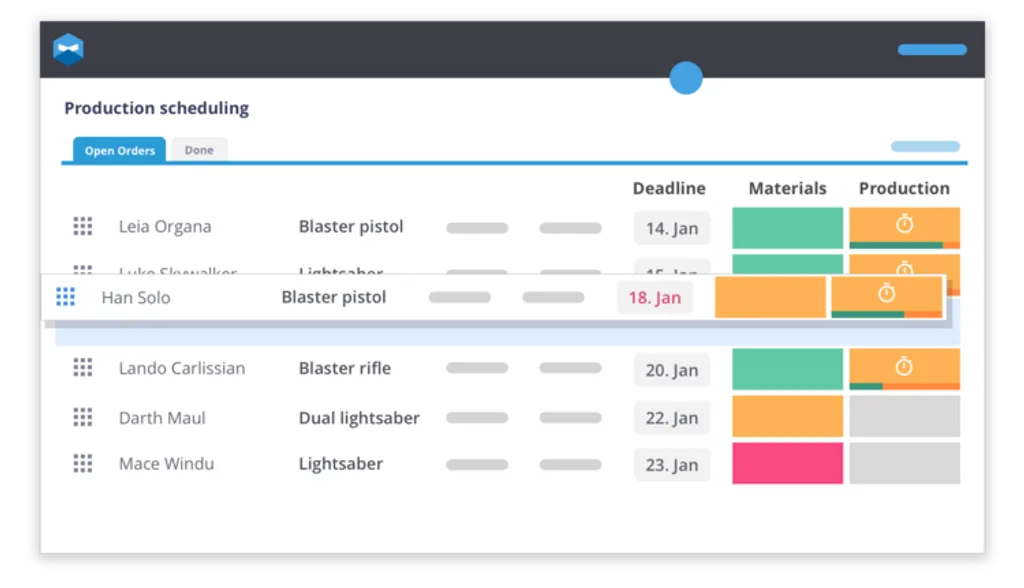
At its core, production scheduling software for small business is designed to turn the “what‑if” scenarios of a manual schedule into data‑driven decisions. When a new order arrives, the system evaluates current workload, material availability, and machine capacity, then suggests the optimal start time and sequence. This reduces the guesswork that often leads to overtime, rushed setups, or under‑utilized equipment.
Beyond time savings, the software provides a single source of truth for the entire team. Shop floor workers can see their tasks on tablets or displays, while managers receive dashboards that highlight on‑time performance, order status, and potential delays. The transparency helps align expectations across departments, from sales to procurement, and minimizes the costly “telephone game” of miscommunication.
For small businesses, the impact is amplified because even a modest improvement in throughput can translate into a significant increase in revenue. A 10% boost in machine utilization, for example, may free up capacity to accept additional orders without hiring extra staff.
Key Features of Production Scheduling Software for Small Business
- Real‑time Gantt charts that display the entire production plan, allowing quick adjustments when urgent orders appear.
- Capacity planning tools that calculate available labor hours and machine time, preventing overallocation.
- Material availability checks integrated with inventory systems to ensure that required components are on hand before scheduling.
- Automatic rescheduling when disruptions occur, such as machine breakdowns or late material deliveries.
- User‑friendly mobile interface so floor workers can update task status instantly, reducing paperwork.
- Reporting and analytics that track key performance indicators like on‑time delivery rate and average lead time.
These capabilities are not exclusive to enterprise‑grade solutions. Modern cloud‑based platforms are built with modular pricing, enabling small firms to select only the functionalities they need. This scalability ensures that the software grows alongside the business, avoiding the pitfalls of a one‑size‑fits‑all approach.
Choosing the Right Solution
The market now offers dozens of options, ranging from niche tools focused solely on job‑shop scheduling to broader manufacturing suites that bundle inventory, procurement, and accounting modules. When evaluating alternatives, start by mapping your specific pain points: Do you need better visibility of machine capacity? Is material shortage a recurring issue? Are you looking for a tool that integrates with an existing ERP or accounting package?
Next, assess the total cost of ownership. While some vendors advertise low monthly fees, hidden costs can arise from implementation services, training, or add‑on modules. A clear comparison spreadsheet that lists licensing, support, and upgrade expenses will help keep the selection process objective.
Finally, request a live demo that mirrors your actual production environment. Seeing how the software handles a realistic order queue, including rush jobs and resource constraints, provides confidence that the tool will perform under day‑to‑day pressures.
Cost Considerations for Production Scheduling Software for Small Business
- Subscription vs. perpetual licensing: Subscriptions spread costs over time and often include updates, while perpetual licenses require larger upfront investment.
- Tiered user pricing: Some platforms charge per user seat, which can be economical if only a few managers need full access.
- Implementation fees: Look for vendors that offer self‑service onboarding or free migration assistance.
- Training resources: Free webinars, knowledge bases, and community forums can reduce the need for paid training sessions.
When the budget is tight, consider solutions that integrate with tools you already use. For instance, many production scheduling platforms connect directly to popular inventory management software for manufacturing companies, eliminating the need for a separate stock‑tracking system.
Implementation Best Practices

Even the most feature‑rich production scheduling software for small business will fall short if the rollout is mishandled. Below are proven steps to ensure a smooth transition from manual scheduling to an automated environment.
- Start with a pilot: Choose a single production line or product family to test the software. This limits risk while providing real data for refinement.
- Define clear data inputs: Accurate order details, bill‑of‑materials, and machine calendars are essential. Clean up legacy data before migration.
- Engage end‑users early: Involve shop floor supervisors and operators in configuration sessions. Their feedback will shape intuitive dashboards.
- Set measurable goals: Establish baseline metrics—such as average lead time—and track improvements after go‑live.
- Provide ongoing support: Assign a “champion” within the organization to answer questions and liaise with the vendor.
One common hurdle is integration with existing business tools. A seamless link between production scheduling software for small business and your accounting or payroll system prevents duplicate data entry. For example, pairing the scheduler with an online payroll software for small business can automatically align labor costs with scheduled shifts, giving a more accurate picture of job profitability.
Integrating Production Scheduling Software for Small Business with Existing Tools
Most modern platforms offer APIs or pre‑built connectors for popular ERP, CRM, and accounting packages. When planning integration, follow these steps:
- Map data fields: Ensure that order numbers, customer IDs, and item codes match across systems.
- Test synchronization in a sandbox environment before moving to production.
- Establish data refresh intervals (real‑time, hourly, daily) based on the criticality of the information.
- Document error handling procedures so that any mismatches are quickly resolved.
Successful integration reduces manual entry, minimizes errors, and provides a holistic view of the business—from sales forecast to shop floor execution.
Maximizing ROI After Go‑Live

Implementation is only the first milestone. To fully realize the benefits of production scheduling software for small business, adopt a continuous improvement mindset. Regularly review the analytics dashboard to spot recurring bottlenecks. If a particular machine frequently causes delays, consider preventive maintenance or capacity upgrades.
Another lever is workforce optimization. By analyzing scheduled labor against actual output, you can fine‑tune shift patterns, reducing overtime while maintaining on‑time delivery rates. Coupling the scheduler with a performance management software for small business creates a feedback loop: scheduled targets become measurable performance goals.
Finally, keep an eye on emerging features. Many vendors release updates that add AI‑driven demand forecasting, drag‑and‑drop scenario planning, or enhanced mobile capabilities. Periodic feature reviews ensure that you leverage new tools that can further streamline operations.
In summary, production scheduling software for small business offers a practical pathway to transform chaotic, manual processes into a predictable, data‑driven workflow. By selecting a solution that matches your operational needs, integrating it thoughtfully with existing systems, and committing to ongoing optimization, small manufacturers can unlock higher efficiency, better customer satisfaction, and sustainable growth. The journey may require careful planning, but the payoff—visible in reduced lead times, higher machine utilization, and clearer insight into the business—justifies the investment.