Table of Contents
- Why Apply for a Business Credit Card Online?
- Key Advantages
- Understanding Eligibility Criteria
- Tips to Strengthen Your Profile
- Gathering Required Documentation
- Step‑by‑Step Online Application Process
- 1. Choose the Right Card
- 2. Begin the Application
- 3. Enter Business Information
- 4. Provide Personal Details of the Primary Officer
- 5. Upload Supporting Documents
- 6. Review Terms and Submit
- 7. Set Up Online Account Management
- Common Pitfalls and How to Avoid Them
- Incomplete or Inaccurate Information
- Overlooking Pre‑Qualification Limits
- Ignoring Existing Debt Levels
- Failing to Match Card Features to Business Needs
- Managing Your New Business Credit Card
- Integrate with Accounting Software
- Monitor Credit Utilization
- Leverage Reward Programs
- Stay Informed About Fee Changes
Applying for a business credit card online has become a routine part of modern entrepreneurship. Small owners, freelancers, and growing enterprises all rely on the convenience of digital applications to secure the credit they need without stepping foot in a bank. This article walks you through the entire process, from assessing eligibility to completing the final steps, while highlighting practical tips that keep the experience smooth and efficient.
When you type “apply for a business credit card online” into a search engine, you’ll encounter dozens of offers, each promising rewards, low rates, or generous credit limits. The sheer volume can be overwhelming, especially for first‑time applicants. By breaking the journey into manageable stages, you can make an informed decision, avoid common pitfalls, and increase the likelihood of approval.
In the following sections, we will explore why online applications are popular, what documents you’ll need, the exact sequence of clicks, and how to manage your card after approval. The guide is written in a straightforward, narrative style so you can follow along as if you were watching a colleague walk you through the process.
Why Apply for a Business Credit Card Online?
Digital applications offer speed, flexibility, and transparency. Most issuers provide instant pre‑qualification checks that let you gauge your chances without affecting your credit score. Additionally, online portals allow you to compare multiple cards side by side, filter by reward categories, and read user reviews—all from a single device.
Online platforms also integrate security features such as multi‑factor authentication and encrypted data transmission, protecting sensitive business information. For businesses that already manage finances through cloud‑based accounting software, linking a newly approved credit card can often be automated, simplifying expense tracking and reconciliation.
Key Advantages
- Instant pre‑qualification results.
- Ability to compare offers quickly.
- Secure data handling.
- Seamless integration with accounting tools.
- Reduced need for physical paperwork.
Understanding Eligibility Criteria
Before you even click “Apply,” it’s crucial to understand the baseline requirements most issuers set. While each bank tailors its own rules, the following factors are universally examined:
- Business Age: Most cards require the business to be operational for at least six months to one year.
- Revenue Threshold: Annual gross revenue often needs to exceed a minimum figure, typically ranging from $10,000 to $50,000.
- Credit Score: Both the personal credit score of the primary owner and the business credit score (if established) influence approval odds.
- Legal Structure: Corporations, LLCs, and sole proprietorships are all eligible, but documentation requirements differ.
- Industry Risk: Certain high‑risk sectors may face higher scrutiny or limited card options.
For businesses in high‑risk categories, understanding the landscape of high‑risk credit card processing can be especially important. A detailed overview is available in our article Understanding the Landscape of High‑Risk Credit Card Processing, which outlines how risk assessments affect card eligibility.
Tips to Strengthen Your Profile
- Maintain a personal credit score above 680.
- Keep business financial statements up to date.
- Pay existing debts on time to demonstrate responsible credit behavior.
- Use a consistent legal name and EIN across all documents.
- Consider establishing a business credit file with agencies such as Dun & Bradstreet.
Gathering Required Documentation
When you move from pre‑qualification to a full application, the issuer will request a set of documents to verify the information you provided. Preparing these ahead of time reduces delays and prevents the need for multiple uploads.
Typical documentation includes:
- Employer Identification Number (EIN): Issued by the IRS, this number identifies your business for tax purposes.
- Business Formation Documents: Articles of incorporation, operating agreements, or DBA filings, depending on your legal structure.
- Financial Statements: Recent profit & loss statements, balance sheets, or cash flow statements.
- Bank Statements: Usually the last two to three months of business checking account activity.
- Personal Identification: Government‑issued ID (driver’s license or passport) for the primary applicant.
- Tax Returns: Personal and, if available, business tax returns for the past year.
Some issuers also request a copy of your most recent payroll report or a lease agreement for your office space. Having these files saved as PDF or high‑resolution images ensures smooth uploading.
Step‑by‑Step Online Application Process
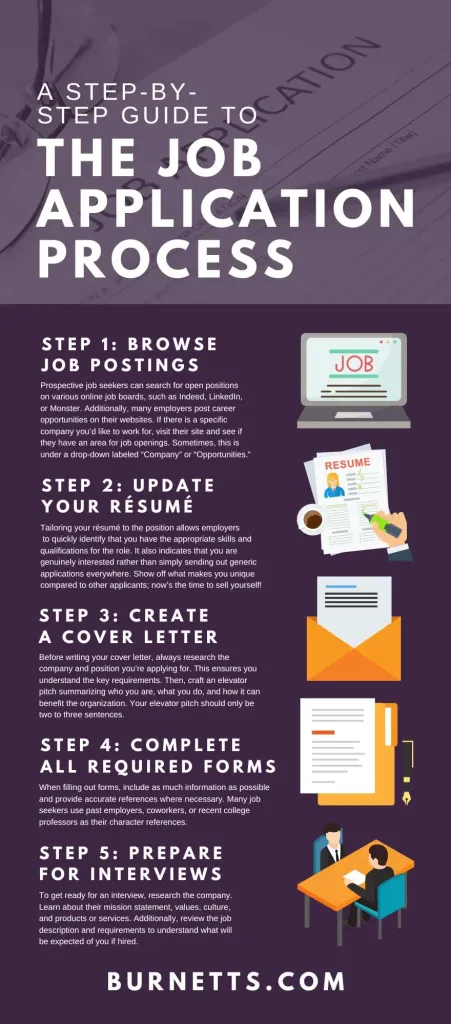
With eligibility confirmed and documents ready, you can begin the actual online application. Below is a generic flow that applies to most major banks and credit card networks.
1. Choose the Right Card
Start by browsing the issuer’s website. Use filters for reward categories (e.g., travel, office supplies) and annual fees. Many providers display a “pre‑qualify now” button that performs a soft credit pull.
2. Begin the Application
Click the “Apply Now” link. You will be directed to a secure form where you enter both personal and business details.
3. Enter Business Information
- Legal business name and DBA (if applicable).
- EIN and business address.
- Industry code (NAICS or SIC).
- Annual revenue and average monthly spend.
4. Provide Personal Details of the Primary Officer
- Full name, date of birth, and Social Security Number (for the soft credit check).
- Home address and contact number.
- Employment information if you are self‑employed.
5. Upload Supporting Documents
Most platforms have a drag‑and‑drop area. Upload the PDFs prepared earlier. Double‑check that each file is legible; a blurry bank statement can cause a rejection.
6. Review Terms and Submit
Read the card’s interest rates, fees, reward structures, and any introductory offers. Confirm you understand the card’s policy on foreign transaction fees, late payment penalties, and credit limit adjustments. After checking the box for agreement, click “Submit.”
Many issuers provide an instant decision within minutes. If the system needs additional review, you’ll receive an email within 24‑48 hours. For faster processing, consider checking our article How Fast Can You Get a Capital One Credit Card? Inside the Approval Time Secrets, which explains typical timelines for rapid approvals.
7. Set Up Online Account Management
Once approved, you’ll receive login credentials for the issuer’s online portal. Take a few minutes to set up alerts for spending limits, due dates, and suspicious activity. Enrolling in paperless statements further reduces clutter and supports sustainability goals.
Common Pitfalls and How to Avoid Them
Even with thorough preparation, certain mistakes frequently derail applications. Recognizing these early can save time and frustration.
Incomplete or Inaccurate Information
Small typographical errors in the EIN or business address can trigger an automatic denial. Always verify the data against official documents before submitting.
Overlooking Pre‑Qualification Limits
Some pre‑qualification tools cap the credit line you can receive. If your business requires a higher limit, consider applying directly without the pre‑qual filter, understanding that a hard credit inquiry may occur.
Ignoring Existing Debt Levels
High existing credit utilization—both personal and business—signals risk to lenders. Aim to keep utilization below 30 % before applying.
Failing to Match Card Features to Business Needs
A card that rewards travel may not benefit a company that spends heavily on office supplies. Align the reward categories with your actual spend patterns to maximize value.
Managing Your New Business Credit Card
Approval is only the beginning. Effective management of your business credit card can improve cash flow, bolster credit scores, and unlock additional perks.
Integrate with Accounting Software
Most issuers allow automatic feed export to platforms like QuickBooks, Xero, or FreshBooks. Setting up this integration within the first week ensures that expenses are categorized in real time, reducing month‑end workload.
Monitor Credit Utilization
Maintain a utilization rate below 30 % to preserve a healthy credit score. If your business experiences a seasonal spike, request a temporary credit limit increase before the surge.
Leverage Reward Programs
Understand the redemption process for points, cash back, or travel miles. Some cards, such as the Chase Sapphire Reserve Business Credit Card, offer enhanced travel benefits that can be combined with personal travel rewards. A deep dive into that card’s features can be found in Unlock the Power of Business Travel with the Chase Sapphire Reserve Business Credit Card – A 2026 Deep Dive.
Stay Informed About Fee Changes
Issuers may adjust annual fees or interest rates after the introductory period. Set calendar reminders to review the card agreement annually and evaluate whether the card still meets your needs.
By following these practices, your business credit card becomes a strategic financial tool rather than just a line of credit.
Applying for a business credit card online is a straightforward process when approached methodically. Start with a clear assessment of eligibility, gather the required documents, and walk through the digital form step by step. Avoid common errors, integrate the card with your accounting workflow, and regularly monitor usage to extract maximum value. With the right preparation, your business can secure the financing it needs to grow, all from the comfort of a secure online portal.